GlobeOne App: Features, Registration, Login
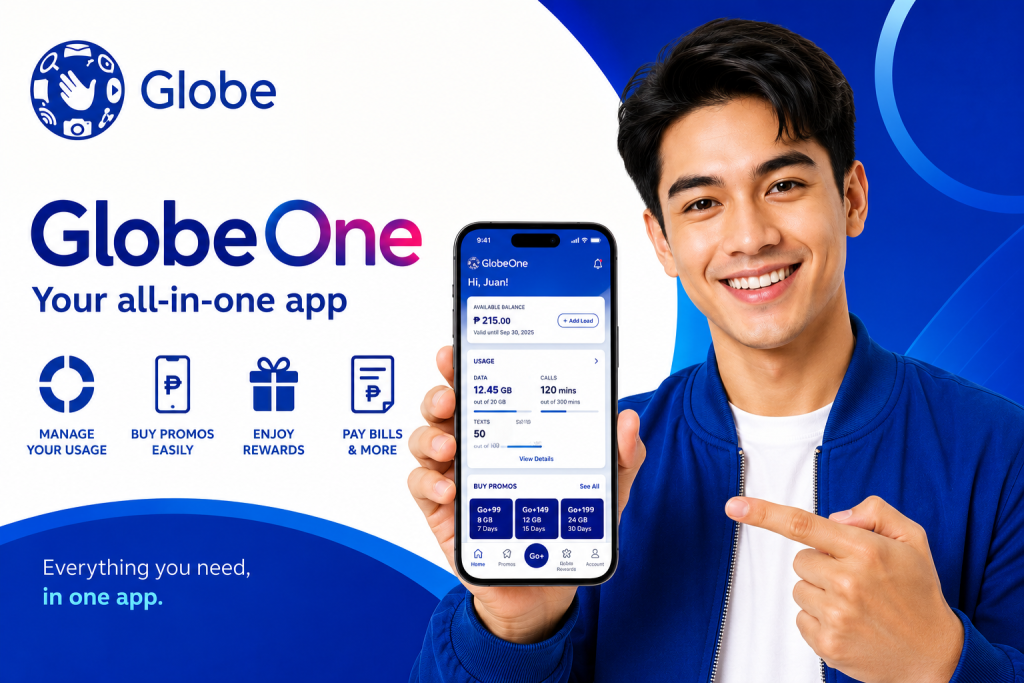
The Globe One App is the official self-service mobile application for Globe and TM subscribers in the Philippines. It allows users to manage their accounts, check balances, buy promos, monitor data usage, pay bills, redeem rewards, and access various Globe services directly from their smartphones.
Instead of dialing codes or visiting physical stores, subscribers can conveniently manage their mobile and broadband accounts anytime and anywhere through the GlobeOne App.
Whether you are a prepaid user, postpaid subscriber, TM customer, or Globe At Home user, the GlobeOne App provides a simple and efficient way to stay connected and in control of your account.
What Is the GlobeOne App?
The GlobeOne App is a mobile account management platform designed for Globe Telecom customers. It serves as a central hub where users can access account information, subscribe to promos, monitor usage, and receive exclusive offers.
The app combines multiple Globe services into a single platform, making account management faster and more convenient.
Key Features of the GlobeOne App
The GlobeOne App offers a wide range of useful features for subscribers.
Check Load Balance
Prepaid users can instantly view their remaining load balance without dialing special codes.
Monitor Data Usage
Users can track:
- Remaining mobile data
- Promo data allocation
- Data consumption history
- Data expiration dates
Buy and Register Promos
The app allows users to browse and subscribe to various Globe and TM promos, including:
- Data promos
- Call promos
- Text promos
- Combo packages
- Unlimited internet offers
Pay Bills
Postpaid subscribers can conveniently:
- View billing details
- Check due dates
- Pay bills online
- Download billing statements
Redeem Globe Rewards
Users can earn and redeem reward points directly through the app.
Popular reward categories include:
- Mobile data
- Shopping vouchers
- Dining discounts
- Lifestyle rewards
- Entertainment perks
Manage Multiple Accounts
The GlobeOne App supports multiple account management.
Users can add:
- Globe prepaid numbers
- Globe postpaid accounts
- TM mobile numbers
- Globe At Home broadband accounts
Receive Exclusive Offers
Subscribers often receive app-exclusive promotions and special discounts unavailable through other channels.
Benefits of Using the GlobeOne App
Using the GlobeOne App provides several advantages.
Convenient Account Management
Everything can be managed from one application.
Real-Time Usage Tracking
Users can monitor data and balance updates instantly.
Faster Promo Registration
Registering promos requires only a few taps.
Secure Transactions
The app uses secure authentication and account verification measures.
24/7 Accessibility
Subscribers can access their accounts anytime without visiting a Globe store.
How to Download the GlobeOne App
Downloading the app is simple.
For Android Users
- Open Google Play Store.
- Search for “GlobeOne.”
- Tap Install.
- Wait for the download to complete.
For iPhone Users
- Open the App Store.
- Search for “GlobeOne.”
- Tap Get.
- Install the application.
After installation, open the app and begin account registration.
How to Register on the GlobeOne App
Follow these steps to create an account.
Step 1: Open the GlobeOne App
Launch the application after installation.
Step 2: Enter Your Mobile Number
Input your Globe or TM number.
Step 3: Verify Your Number
An OTP (One-Time Password) will be sent through SMS.
Enter the verification code.
Step 4: Complete Account Setup
After verification, your account will be successfully linked to the app.
You can now access all available features.
How to Log In to GlobeOne App
Logging in is quick and straightforward.
- Open the GlobeOne App.
- Enter your registered mobile number.
- Complete OTP verification if requested.
- Access your account dashboard.
The app may also support biometric login on compatible devices.
How to Check Globe or TM Balance Using GlobeOne
To view your balance:
- Open the GlobeOne App.
- Sign in to your account.
- Select your mobile number.
- View your remaining load balance on the dashboard.
The balance is displayed in real time.
How to Check Data Usage in GlobeOne
Users can monitor internet usage by:
- Opening the GlobeOne App.
- Selecting their registered account.
- Viewing the Data Usage section.
The dashboard displays:
- Remaining data
- Consumed data
- Promo validity
- Expiration dates
How to Register Promos Using GlobeOne
To subscribe to a promo:
- Open the app.
- Tap Buy Promo.
- Browse available offers.
- Select your preferred package.
- Confirm registration.
The promo will be activated after successful processing.
How to Pay Globe Postpaid Bills
Paying bills through GlobeOne is simple.
- Open the GlobeOne App.
- Select your postpaid account.
- Tap Pay Bill.
- Choose your payment method.
- Confirm the transaction.
A payment confirmation will appear after successful processing.
How to Redeem Rewards in GlobeOne
To redeem rewards:
- Open the app.
- Navigate to the Rewards section.
- View available rewards.
- Select your preferred reward.
- Confirm redemption.
Reward points will be deducted automatically.
Common GlobeOne App Problems and Solutions
OTP Not Received
Possible solutions include:
- Checking network signal strength
- Restarting your device
- Requesting a new OTP
- Verifying your mobile number
App Not Loading
Try:
- Updating the app
- Restarting your device
- Clearing app cache
- Reinstalling the application
Login Issues
Ensure:
- The correct mobile number is used
- Internet connection is stable
- App version is up to date
Promo Registration Failed
Check if:
- Your balance is sufficient
- The promo is still available
- Network connectivity is stable
Frequently Asked Questions
Is the GlobeOne App free?
Yes. The GlobeOne App can be downloaded and used for free.
Can TM users use the GlobeOne App?
Yes. TM subscribers can manage their accounts through the GlobeOne App.
Can I register promos using GlobeOne?
Yes. The app supports promo registration for Globe and TM users.
Can I check my data balance through the app?
Yes. The app displays remaining data, usage history, and promo validity.
Can I manage multiple numbers in GlobeOne?
Yes. Multiple Globe, TM, and broadband accounts can be added and managed in a single app.
Is GlobeOne safe to use?
Yes. The app uses secure account verification and authentication measures to protect user information.
Tips for Using GlobeOne Efficiently
To get the most from the app:
- Keep the app updated.
- Enable notifications for promo alerts.
- Monitor data usage regularly.
- Redeem rewards before they expire.
- Use secure login options when available.
- Check for app-exclusive offers frequently.
Conclusion
The GlobeOne App is an essential tool for Globe and TM subscribers who want convenient access to account management, promo registration, bill payments, rewards redemption, and data monitoring. With its user-friendly interface and comprehensive features, the app simplifies mobile account management while providing real-time access to important account information.
Whether you are a prepaid customer, postpaid subscriber, or broadband user, the GlobeOne App offers a fast, secure, and efficient way to manage your services from a single platform.